Cluster federation
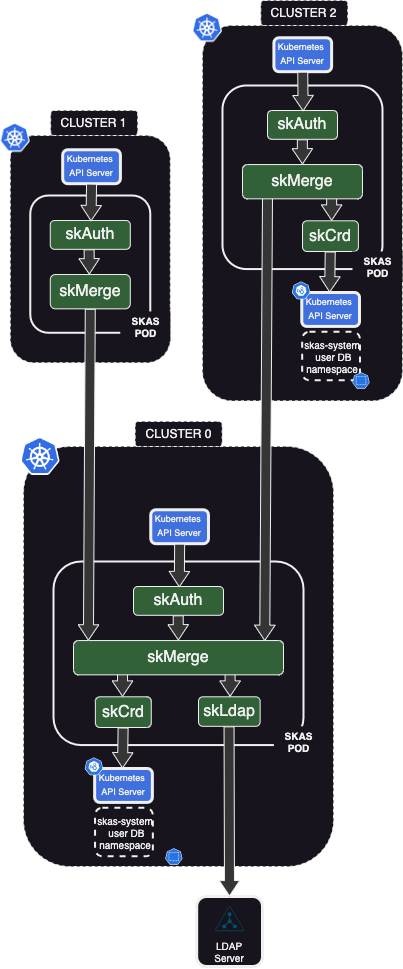
Due to its modular concept and the ability to configure links between modules, even across clusters, SKAS is very effective in a multi-cluster environment.
Here's a sample configuration to illustrate this:
Cluster0serves as a kind of 'control' cluster, acting as a 'hub' and providing centralized user information. It can be dedicated to this role or host other control functions.Cluster1is a standard cluster that hosts typical workloads. It relies entirely onCluster0for user authentication.Cluster2is similar toCluster1, but it can also manage some local users and/or groups."
Of course, this is just one example of what could be achieved with SKAS.
In the rich Kubernetes ecosystem, there are several solutions, such as Submariner, Skupper, Cilium ClusterMesh, Liqo, and more, aimed at extending the concept of Kubernetes
servicesacross clusters. While these can be used in our cases, the configuration described here relies on 'pure vanilla', independent Kubernetes clusters.

Cluster0 deployment.
Here are two samples of value files for cluster0
- One with only the local user database.
- Another one with also an external LDAP server.
The LDAP server sample will help illustrate the chaining of providers.
Here is the values file with only the local user database (It is activated by default):
values.cluster0-noldap.yaml
clusterIssuer: your-cluster-issuer

skAuth:
  exposure:
    external:
      ingress:
        host: skas.ingress.cluster0
  kubeconfig:
    context:
      name: skas@cluster0
    cluster:
      apiServerUrl: https://kubernetes.ingress.cluster0

skMerge:
  exposure:
    external:
      enabled: true
      services:
        identity:
          disabled: false
          clients:
            - id: cluster1
              secret: cluster0Cluster1SharedSecret
            - id: cluster2
              secret: cluster0Cluster2SharedSecret
      ingress:
        enabled: true
        host: skas-skmerge.ingress.cluster0
The first part includes what was previously in a separate values.init.yaml file in other samples within this
documentation. Consequently, this file can be used for the initial deployment or for upgrading an existing one.
Then, there is the part specific to this configuration. The identiy service of the
skMerge module is exposed externally, and authentication is required from the callers, which will be the two
other clusters.
Furthermore, this service must be accessed externally. So, set ingress.enable: true and adjust the ingress.host
value to your specific context.
Remember that the
ingress.hostvalue must also be defined in your DNS.
Here is the values file, including the LDAP external server as well:
values.cluster0-ldap.yaml
clusterIssuer: your-cluster-issuer

skAuth:
  exposure:
    external:
      ingress:
        host: skas.ingress.cluster0
  kubeconfig:
    context:
      name: skas@cluster0
    cluster:
      apiServerUrl: https://kubernetes.ingress.cluster0

skLdap:
  enabled: true
  # --------------------------------- LDAP configuration
  ldap:
    host: ldap.mydomain.internal
    insecureNoSSL: false
    rootCaData: "LS0tLS1CRUdJTiBDRVJUSUZ................................lRJRklDQVRFLS0tLS0K"
    bindDN: cn=Manager,dc=mydomain,dc=internal
    bindPW: admin123
    groupSearch:
      baseDN: ou=Groups,dc=mydomain,dc=internal
      filter: (objectClass=posixgroup)
      linkGroupAttr: memberUid
      linkUserAttr: uid
      nameAttr: cn
    timeoutSec: 10
    userSearch:
      baseDN: ou=Users,dc=mydomain,dc=internal
      cnAttr: cn
      emailAttr: mail
      filter: (objectClass=inetOrgPerson)
      loginAttr: uid
      numericalIdAttr: uidNumber

skMerge:
  providers:
    - name: crd
    - name: ldap
  exposure:
    external:
      enabled: true
      services:
        identity:
          disabled: false
          clients:
            - id: cluster1
              secret: cluster0Cluster1SharedSecret
            - id: cluster2
              secret: cluster0Cluster2SharedSecret
      ingress:
        enabled: true
        host: skas-skmerge.ingress.cluster0
Please refer to LDAP Setup for instructions on how to configure the connection to this external LDAP server.
To apply the choosen configuration, please ensure that you have a kubectl configuration set up to target cluster1
with administrator privileges, and then enter one of the following commands:
helm -n skas-system upgrade -i skas skas/skas --values ./values.cluster0-noldap.yaml --create-namespace
or:
helm -n skas-system upgrade -i skas skas/skas --values ./values.cluster0-ldap.yaml --create-namespace
If this is the first deployment on this cluster, don't forget also to configure the API Server
For the configuration of the two other clusters, you will need the Certificate Authority of the ingress on the
skMerge identity endpoint, encoded in base64. You can retrieve it with the following command:"
Cluster1 deployment
Here is a sample values file for the deployment of cluster1:
values.cluster1.yaml
clusterIssuer: your-cluster-issuer

skAuth:
  exposure:
    external:
      ingress:
        host: skas.ingress.cluster1
  kubeconfig:
    context:
      name: cluster1
    cluster:
      apiServerUrl: https://kubernetes.ingress.cluster1

skMerge:
  providers:
    - name: cluster0

  providerInfo:
    cluster0:
      url: https://skas-skmerge.ingress.cluster0
      rootCaData: "LS0tLS1CRUdJTiBDRV.............09Ci0tLS0tRU5EIENFUlRJRklDQVRFLS0tLS0K"
      insecureSkipVerify: false
      clientAuth:
        id: cluster1
        secret: cluster0Cluster1SharedSecret

skCrd:
  enabled: false
Once again, the first part includes what was previously stored in a separate values.init.yaml file,
which has been used in other samples within this documentation.
Then, within the configuration:
- The
skMerge.providerslist contains only one provider:cluster0, which is defined just below it. - The
providerInfo.cluster0.urltargets the ingress we've set up oncluster0in order to reach its identity service. - The
providerInfo.cluster0.rootCaDatais configured with the base64-encoded Certificate Authority of the ingress on theskMergeidentity endpoint, as we obtained in the previous step. - The
providerInfo.cluster0.clientAuthprovides the required authentication information forcluster0.
To apply this configuration, please ensure that you have a kubectl configuration set up to target cluster1 with
administrator privileges, and then enter the following command:
If this is the first deployment on this cluster, don't forget also to configure the API Server
Testing
In the following, we will use the configuration where an LDAP server is connected to
cluster0.
We can now configure our local Kubernetes config file to authenticate to our clusters through SKAS:
$ kubectl sk init https://skas.ingress.cluster0
> Setup new context 'cluster0' in kubeconfig file '/Users/john/.kube/config'

$ kubectl sk init https://skas.ingress.cluster1
> Setup new context 'cluster1' in kubeconfig file '/Users/john/.kube/config'
We can connect as admin on cluster0 and check what this user looks like:
$ kubectl config use-context cluster0
> Switched to context "cluster0".

$ kubectl sk login admin
> Password:
> logged successfully..

$ kubectl sk user describe admin --explain
> USER    STATUS              UID   GROUPS                          EMAILS           COMMON NAMES               AUTH
> admin   passwordUnchecked   0     admin,all,auditors,skas-admin   admin@xxxx.com   SKAS administrator,admin   crd

> Detail:
> PROVIDER   STATUS              UID    GROUPS               EMAILS           COMMON NAMES
> crd        passwordUnchecked   0      skas-admin                            SKAS administrator
> ldap       passwordUnchecked   2003   all,auditors,admin   admin@xxxx.com   admin
In this example, the user admin exists in both of our providers (crd and ldap). Both sets of values are merged
to provide the user profile (Refer to Identity Providers chaining).
Now, we can perform the same operation on 'cluster1':"
$ kubectl config use-context cluster1
> Switched to context "cluster1".

$ kubectl sk login admin
> Password:
> logged successfully..

$ kubectl sk user describe admin --explain
> USER    STATUS              UID   GROUPS                          EMAILS           COMMON NAMES               AUTH
> admin   passwordUnchecked   0     admin,all,auditors,skas-admin   admin@xxxx.com   SKAS administrator,admin   cluster0

> Detail:
> PROVIDER   STATUS              UID   GROUPS                          EMAILS           COMMON NAMES
> cluster0   passwordUnchecked   0     admin,all,auditors,skas-admin   admin@xxxx.com   SKAS administrator,admin
From the perspective of cluster1, we have only one provider: cluster0. We abstract away the details of how the
admin profile was constructed.
If we wish to expose this information, we can refactor this configuration by connecting
cluster1.skMergedirectly to thecluster0identity providers (crdandldap), one level belowskMerge.
Now, let's attempt to create a new user on cluster1:
$ kubectl config use-context cluster1
> Switched to context "cluster1".

$ kubectl sk whoami
> USER    ID   GROUPS
> admin   0    admin,all,auditors,skas-admin

$ kubectl sk user create localuser1 --generatePassword
> ERRO[0000] API server communication error                error="users.userdb.skasproject.io \"localuser1\" is forbidden: User \"admin\" cannot get resource \"users\" in API group \"userdb.skasproject.io\" in the namespace \"skas-system\""
The operation fails because the admin user does not have the necessary permissions to write to the skas-system
namespace in cluster1. This behavior is intentional, as we intend for user definitions to exist exclusively in
cluster0.
There is a scenario where this operation might appear to succeed: If your admin user also has Kubernetes administrator
privileges (i.e., a member of system:masters), it will be able to write to the skas-system namespace, resulting
in a successful creation. However, it's important to note that users created in this manner will not be recognized
by the system in cluster1, as there is no crd provider present."
$  kubectl config use-context cluster0
> Switched to context "cluster0".

$ kubectl sk user bind admin system:masters
> GroupBinding 'admin.system.masters' created in namespace 'skas-system'.

$ kubectl config use-context cluster1
> Switched to context "cluster1".

$ kubectl sk login admin
> Password:
> logged successfully..

$ kubectl sk whoami
> USER    ID   GROUPS
> admin   0    admin,all,auditors,skas-admin,system:masters

$ kubectl sk user create localuser1 --generatePassword
> The following password has been generated: 'KTeZrzYEgeHS'
> (Save it as it will not be accessible anymore).
> User 'localuser1' created in namespace 'skas-system'.

$ kubectl sk login localuser1 KTeZrzYEgeHS
> Invalid login!
Cluster2 deployment
Here is a sample values file for the deployment of cluster2:
values.cluster2.yaml
clusterIssuer: cluster-issuer1

skAuth:
  exposure:
    external:
      ingress:
        host: skas.ingress.cluster2
  kubeconfig:
    context:
      name: cluster2
    cluster:
      apiServerUrl: https://kubernetes.ingress.cluster2

  # Members of these group will be allowed to perform 'kubectl-sk user describe'
  # Also, they will be granted by RBAC to access token resources
  adminGroups:
    - skas-admin
    - cluster2-skas-admin

skMerge:
  providers:
    - name: cluster0
    - name: crd

  providerInfo:
    cluster0:
      url: https://skas-skmerge.ingress.cluster0
      rootCaData: "LS0tLS1CRUdJTiBDRVJUSUZJQ0FURS...........VNGelVDQT09Ci0tLS0tRU5EIENFUlRJRklDQVRFLS0tLS0K"
      insecureSkipVerify: false
      clientAuth:
        id: cluster2
        secret: cluster0Cluster2SharedSecret

skCrd:
  enabled: true

  initialUser:
    login: cluster2-skas-admin
    passwordHash: $2a$10$ijE4zPB2nf49KhVzVJRJE.GPYBiSgnsAHM04YkBluNaB3Vy8Cwv.G  # admin
    commonNames: ["Cluster2 SKAS administrator"]
    groups:
      - cluster2-skas-admin

  # Members of theses groups will be granted RBAC access to users and groupBinding resources in the namespace above
  adminGroups:
    - cluster2-skas-admin
    - skas-admin
Once again, the first part includes what was previously stored in a separate values.init.yaml file,
which has been used in other samples within this documentation.
Then, within the configuration:
skMerge.providersreference now our localcrdproviders aside the globalcluster0.skMerge.providerInfo.cluster0is the same as forcluster1, except of course theclientAuthpart.- An initial user (
cluster2-skas-system) is created as local admin. This account will only be valid on this cluster. - The list of
adminGroupsmust be defined twice:- One in the
skAuthmodule. This is to allow thekubectl-sk user describecommand for members of these groups. - One in the
skCrdmodule. This is to set up RBAC rules to allow SKAS resources (skusers,groupBindings,tokens) to be managed by members of these groups.
- One in the
To apply this configuration, please ensure that you have a kubectl configuration set up to target cluster2 with
administrator privileges, and then enter the following command:
If this is the first deployment on this cluster, don't forget also to configure the API Server
Testing
We can now configure our local Kubernetes config file to authenticate to cluster2 through SKAS:
$ kubectl sk init https://skas.ingress.cluster2
> Setup new context 'cluster2' in kubeconfig file '/Users/john/.kube/config'
Now, we can log in as the local admin and describe ourself:
$ kubectl sk login cluster2-skas-admin
> Password:
> logged successfully..

$ kubectl sk user describe cluster2-skas-admin --explain
> USER                  STATUS              UID   GROUPS                EMAILS   COMMON NAMES                  AUTH
> cluster2-skas-admin   passwordUnchecked   0     cluster2-skas-admin            Cluster2 SKAS administrator   crd

Detail:
> PROVIDER   STATUS              UID   GROUPS                EMAILS   COMMON NAMES
> cluster0   userNotFound        0
> crd        passwordUnchecked   0     cluster2-skas-admin            Cluster2 SKAS administrator
Ensure we can perform all usual user management operations with this account:
$ kubectl -n skas-system get tokens
> NAME                                               CLIENT   USER LOGIN            AUTH.   USER ID   CREATION               LAST HIT
> tjvygwmtparktpwiiuysydzctbunppkycsykprtdswsramtm            cluster2-skas-admin   crd     0         2023-08-31T12:43:03Z   2023-08-31T12:43:26Z

$ kubectl sk user create cluster2user1 --generatePassword
> The follwing password has been generated: '8fJoM6JFObjO'
> (Save it as it will not be accessible anymore).
> User 'cluster2user1' created in namespace 'skas-system'.

$  kubectl sk user bind cluster2user1 cluster2grp1
> GroupBinding 'cluster2user1.cluster2grp1' created in namespace 'skas-system'.

$ kubectl sk user describe cluster2user1
> USER            STATUS              UID   GROUPS         EMAILS   COMMON NAMES   AUTH
> cluster2user1   passwordUnchecked   0     cluster2grp1                           crd

$ kubectl sk user describe cluster2user1 --explain
> USER            STATUS              UID   GROUPS         EMAILS   COMMON NAMES   AUTH
> cluster2user1   passwordUnchecked   0     cluster2grp1                           crd

> Detail:
> PROVIDER   STATUS              UID   GROUPS         EMAILS   COMMON NAMES
> cluster0   userNotFound        0
> crd        passwordUnchecked   0     cluster2grp1
And check if the newly created user is effective:
$ kubectl sk login cluster2user1 8fJoM6JFObjO
> logged successfully..

$ kubectl sk whoami
> USER            ID   GROUPS
> cluster2user1   0    cluster2grp1

$ kubectl get ns
> Error from server (Forbidden): namespaces is forbidden: User "cluster2user1" cannot list resource "namespaces" in API group "" at the cluster scope
The same operations can also be performed using the
adminaccount because it is a member of theskas-admingroup, which we have included in the twoadminGroupslists in thevalues.cluster2.yamlconfiguration file.